FAA PILOT LOGBOOK

FAA Pilot Logbook. Track currency. Interactive reports.

Built for airline pilots, commercial pilots, private pilots, flight instructors, and student pilots who need a modern digital pilot logbook for iPhone and iPad with FAA-style reporting, currency tracking, Insights, and professional record keeping.

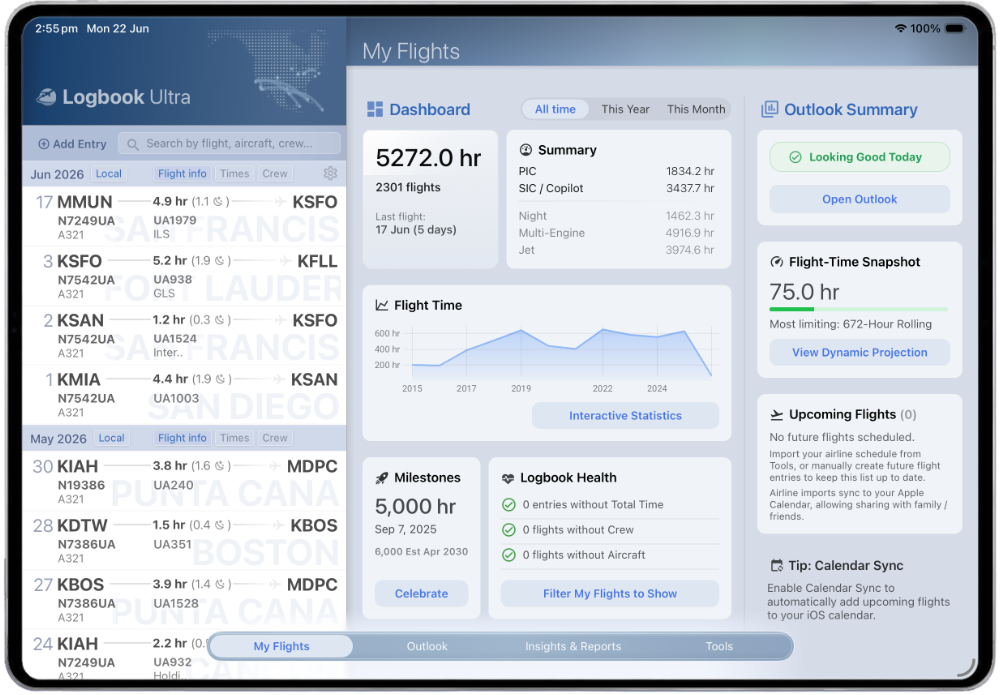
Logbook Ultra Dashboard shown on iPad with flight totals, recent flying, Outlook status, and FAA pilot logbook records.

FAA PDF REPORTS

Generate American-format logbook PDFs.

Create FAA-style PDF reports from your digital logbook, with layout options designed for clean printing, review, and long-term record keeping. When you need an FAA pilot logbook PDF, the report can be prepared in an American-format spread.

PIC / SIC / Dual Night / Instrument Approaches / Landings Simulator entries US date format Decimal hours option

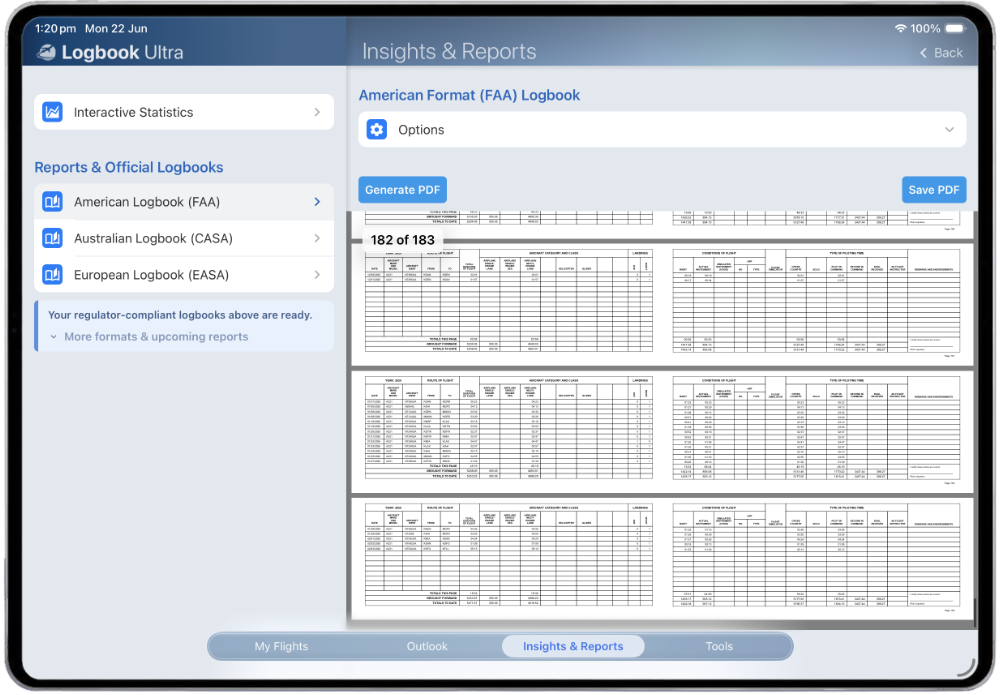
Choose spread layout, include simulator entries, show page numbers, and switch between hours:minutes or decimal-hour presentation depending on how you want your report prepared.

FAA-style American-format logbook PDF generation screen in Logbook Ultra with report options and PDF preview pages.

FAA CURRENCY TRACKING

Know your currency before it becomes a problem.

Outlook surfaces upcoming FAA recency and currency items so you can see what is current, what is expiring, and what needs attention before your next flight. For instrument pilots, Logbook Ultra helps track FAA instrument currency, approaches, holding procedures, and related recency requirements in a dedicated instrument currency logbook view.

  • Passenger day recency (3 takeoffs and landings in 90 days)
  • Passenger night recency
  • IFR currency tracking
  • Instrument Proficiency Check support
  • Medical and licence reminders

Simulator credit and currency settings can be configured where applicable.

Built around FAA recency and currency requirements including 14 CFR 61.57 and FAA medical certification requirements under 14 CFR 61.23.

Logbook Ultra Outlook screen showing FAA currency tracking, passenger recency, IFR currency, medical tracking, and flight-time projections.

FAA FLIGHT-TIME LIMITS

Track FAA flight-time limits where they apply.

For pilots operating under FAA Part 117, Logbook Ultra can track configured flight-time limits and project future scheduled flying against those limits.

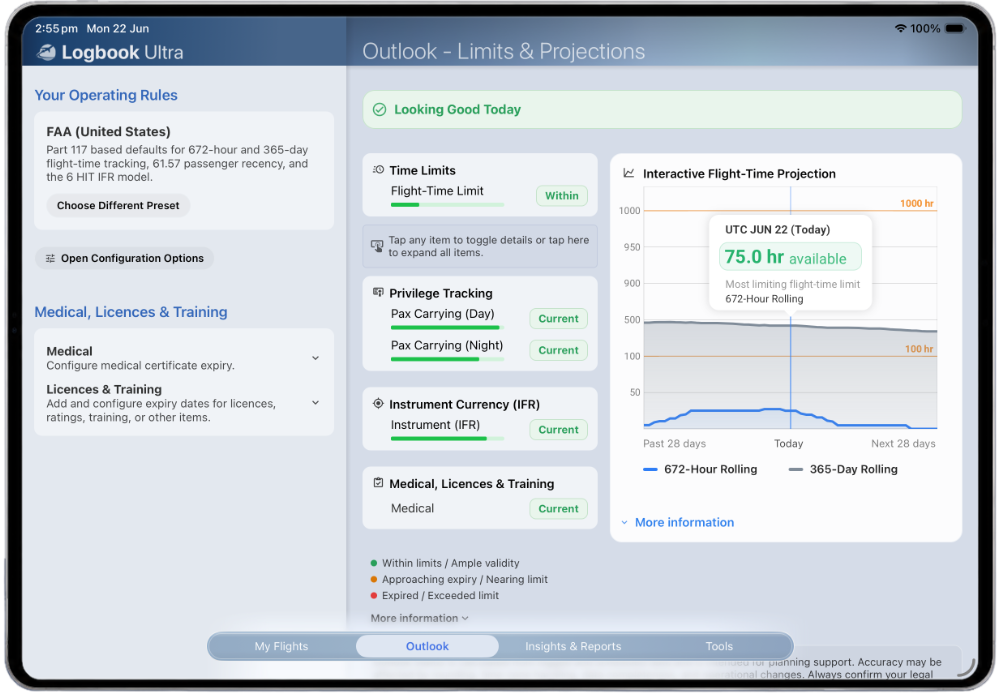
Outlook projects future scheduled flying against FAA flight-time limits, helping identify potential issues before they occur.

  • 100 hours in a 672-hour rolling window.
  • 1,000 hours in a 365-day rolling window.
  • Future scheduled flying projection for potential limit issues.
  • Clear status indicators for items that need attention.

Flight-time limit tracking is designed for supported FAA configurations and should be reviewed against your operation’s requirements.

Supports FAA Part 117 flight-time limits including 14 CFR 117.23(b)(1) and 14 CFR 117.23(b)(2).
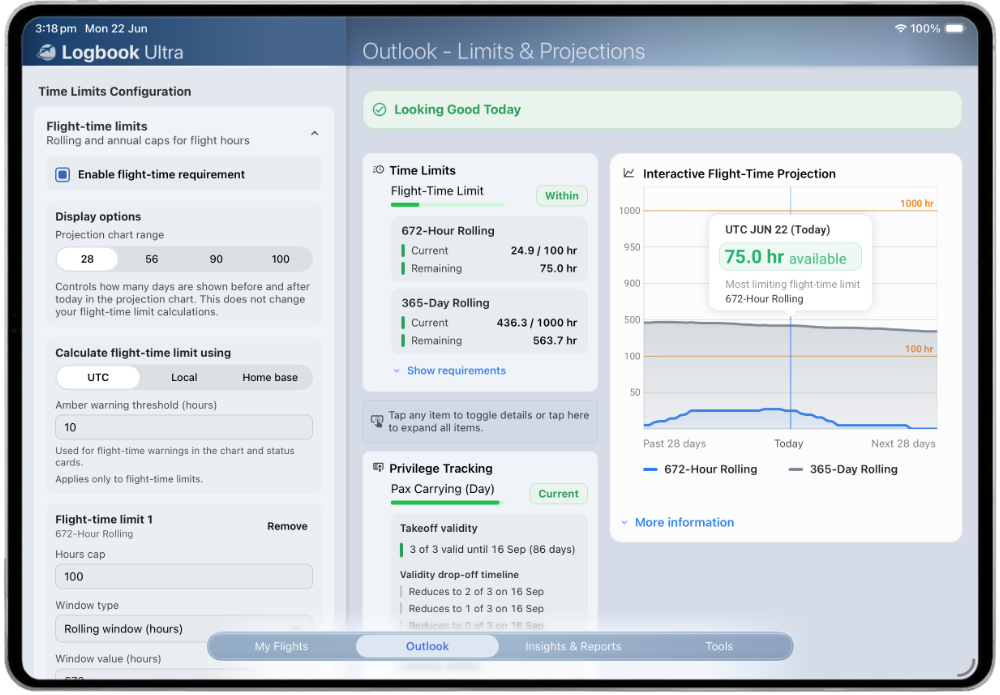
Logbook Ultra Outlook screen showing FAA flight-time limit settings, 672-hour and 365-day rolling totals, and projected flight-time availability.

Professional tools. No complexity.

Ultra includes the tools pilots expect from a modern FAA logbook app and digital pilot logbook, without turning record keeping into admin work.

The FAA preset includes operating-rule support for:

  • Passenger-carrying day recency — 14 CFR 61.57(a)
  • Passenger-carrying night recency — 14 CFR 61.57(b)
  • Instrument currency — 14 CFR 61.57(c)
  • Instrument Proficiency Check support — 14 CFR 61.57(d)
  • Medical certificate tracking — 14 CFR 61.23
  • FAA Part 117 flight-time limits — 14 CFR 117.23(b)(1) and 14 CFR 117.23(b)(2)

Outlook surfaces current status, upcoming expiries, projected issues, and future scheduled flying against supported FAA operating rules.

Search aircraft details quickly using Logbook Ultra’s built-in offline aircraft database. Useful when entering aircraft types, registrations, and logbook details without waiting on a network connection.

Look up airports quickly from an offline database, helping keep route entry fast and consistent whether you are at home, in the sim centre, or on the road.

Where flight data is available, ADS-B autofill can help populate route, aircraft, and timing details to reduce manual entry and improve consistency.

Already using another logbook? Logbook Ultra includes import tools for supported sources including spreadsheets and LogTen Pro and SafeLog exports, helping you continue from your existing history instead of starting again.

Bring structured flight records across from a spreadsheet and continue managing them in a dedicated pilot logbook with reports, summaries, backups, and planning tools.

Keep dedicated backups of your logbook data using iCloud backup support, designed to make long-term record keeping safer and easier.

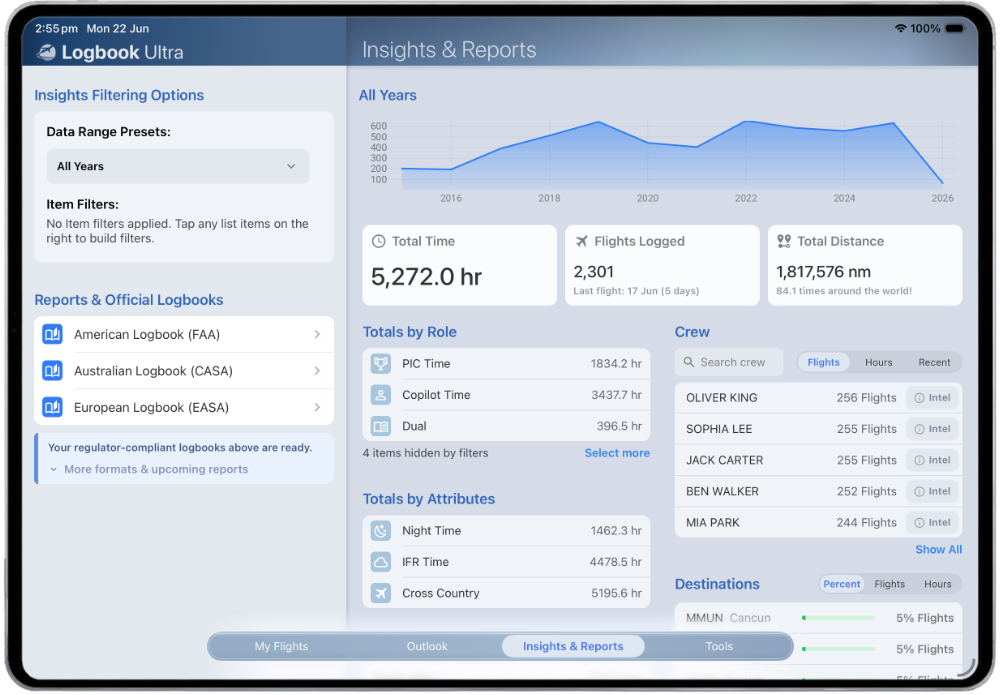
Insights turns your FAA pilot logbook into an interactive report. Explore your flying dynamically by filtering charts, totals, aircraft, crew, routes, destinations, and experience categories. Every chart, total, and list updates automatically as selections change.

LOGBOOK MIGRATION

Moving from another pilot logbook?

Whether you're using LogTen Pro, SafeLog, a spreadsheet, or another supported source, Logbook Ultra includes import tools designed to help you continue from your existing flight log history rather than start again.

  • Import from supported spreadsheet formats.
  • Import from LogTen Pro exports.
  • Import from SafeLog exports.
  • Use previous experience totals where appropriate.
  • Continue with Dashboard, Outlook, Insights, and PDF reports.

EXPLORE LOGBOOK ULTRA

Track flights. Stay current. Be ready when it matters.

Logbook Ultra combines flight logging, FAA-style reports, currency tracking, interactive Insights, imports, and backups in one professional digital pilot logbook for iPhone and iPad.

Download on the App Store Explore the full Logbook Ultra feature set
Explore Logbook Ultra Logbook Ultra Insights and Reports screen with FAA and CASA logbook report options, totals, trends, and pilot logbook summaries. Download on the App Store