
Best fit for a professional iPad experience
Logbook Ultra: Dashboard, interactive Insights, Crew Intel, Limits & Projections, supported roster imports and focused professional reports.
PILOT LOGBOOK APP COMPARISON
Electronic pilot logbooks can look similar until you compare the way they handle devices, airline imports, analytics, limits, reports and migration.
This guide helps pilots compare the major options based on how they actually fly, not simply which product has the longest feature list.
QUICK COMPARISON
There is no single best pilot logbook for every pilot. The right choice usually depends on one or two priorities that matter more than everything else.
Logbook Ultra: Dashboard, interactive Insights, Crew Intel, Limits & Projections, supported roster imports and focused professional reports.
MyFlightbook: Free with basic logbook functionality.
SafeLog, MyFlightbook, CrewLounge or FLYLOG.io: Broader desktop, mobile and/or browser access than an iPhone-and-iPad-only app, though usually at a cost of capabilities and usability.
ForeFlight Logbook: A natural option for pilots already using ForeFlight for planning and flight operations who just require a basic logbook.
DECISION FRAMEWORK
Most established pilot logbooks can record flights and calculate totals. The important differences appear in the workflow around those records.
Do you need iPhone and iPad, Android, a browser, Windows or a dedicated Mac application?
Confirm support for your exact airline, schedule source, EFB export or spreadsheet format.
Compare interactive exploration with products that rely more heavily on searches, groups or generated reports.
Look beyond whether a rule exists. Compare how clearly its current and projected status is presented.
Check the exact FAA, CASA, EASA, employment or authority format you need, not the number of templates advertised.
Understand how records are stored, backed up, exported and recovered if you change products later.
Decide whether you want maximum configuration or important information presented with less setup.
PILOT TYPE GUIDE
Prioritise roster and duty imports, Calendar Sync, previous experience, rolling limits, crew history and professional reports.
Worth comparing: Logbook Ultra, CrewLounge PILOTLOG, LogTen, RB Pilot Logbook, FLYLOG.io.
Prioritise ease of entry, currency, aircraft records,cost and access across devices.
Worth comparing: Logbook Ultra, MyFlightbook, ForeFlight Logbook, ZuluLog, SafeLog, Logbook Ultra.
Prioritise reports, historical totals, limits, analytics, career summaries and data portability.
Worth comparing: Logbook Ultra, LogTen, SafeLog, CrewLounge PILOTLOG, Capzlog.
These are starting points, not rankings. The exact devices, authority, airline and migration source still matter.
COMPARISON MATRIX
| Feature | Logbook Ultra | LogTen | SafeLog | CrewLounge PILOTLOG | ForeFlight Logbook | MyFlightbook | RB Pilot Logbook | ZuluLog | Capzlog | FLYLOG.io |
|---|---|---|---|---|---|---|---|---|---|---|
| iPhone | Yes | Yes | Yes | Yes | Yes | Yes | Yes | Yes | Yes | Yes |
| iPad | Yes | Yes | Yes | Yes | Yes | Partial | Yes | Yes | Yes | Yes |
| Easy roster imports | Yes | No | No | No | No | No | Yes | No | No | No |
| External calendar sync | Yes | No | No | No | No | No | No | No | No | |
| Interactive analytics | Yes | Partial | Yes | Partial | Partial | Yes | Partial | Yes | Yes | Yes |
| Android / Windows | No | No | Yes | Yes | No | Yes | Yes | Yes | Yes | Yes |
Product features, prices and platform support can change. Verify the current plan, importer, report and export workflow before choosing or migrating a live pilot logbook.
LOGBOOK ULTRA
Logbook Ultra is designed around a simple idea: a professional logbook should make flying easier to import, understand, monitor and report.
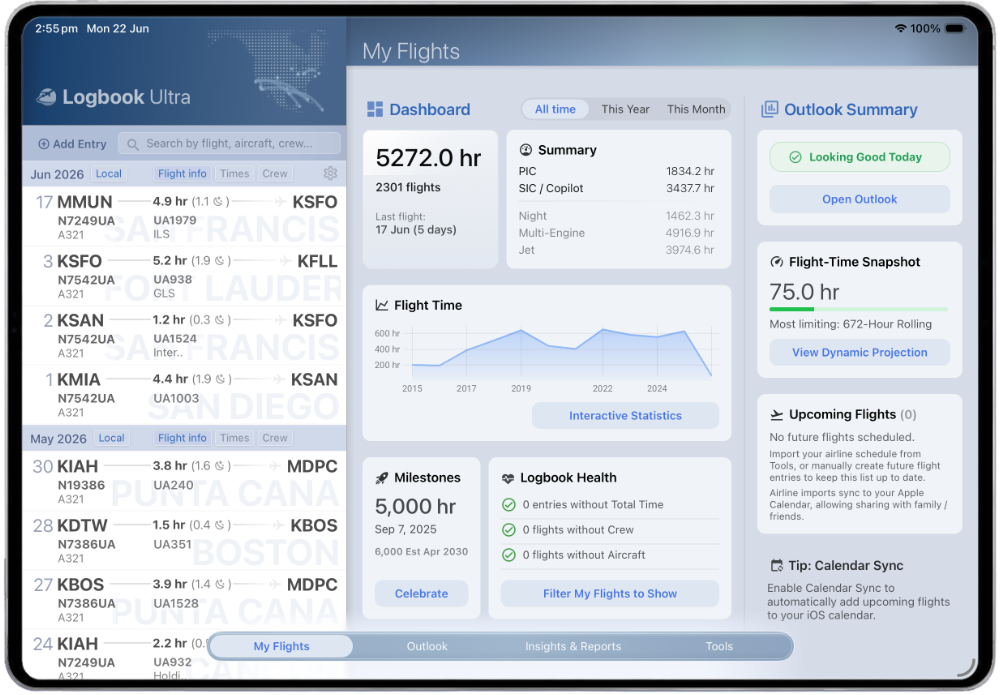
See recent activity, relevant totals, upcoming flights and logbook health from one widescreen iPad workspace.
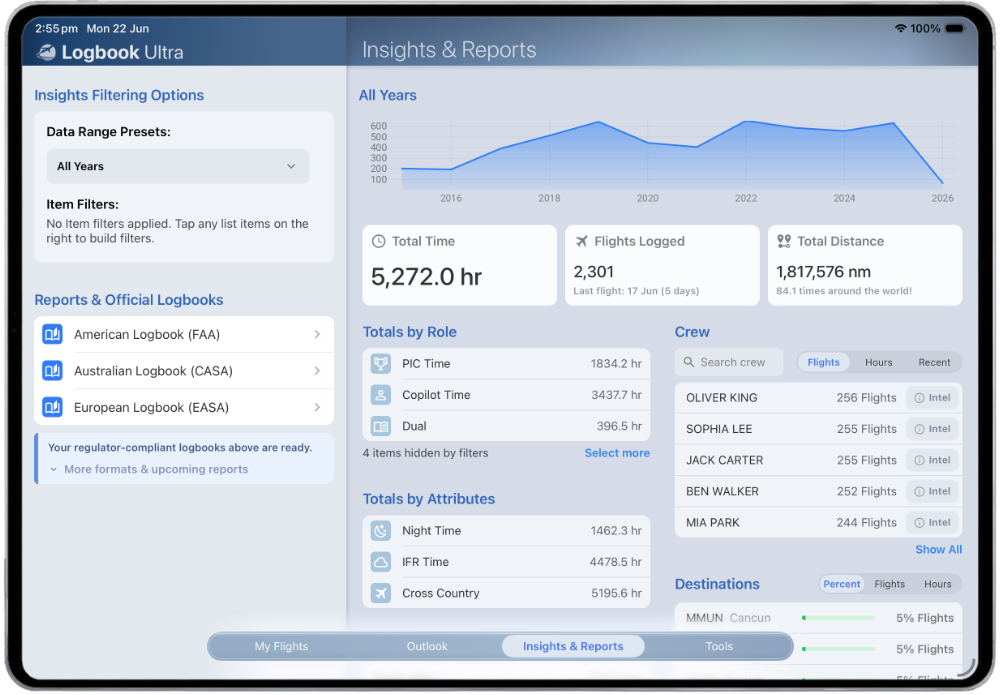
Explore aircraft, routes, trends and the entries behind a total without generating static reports first.
Review frequent crew, shared-flight history, recent pairings and private notes.
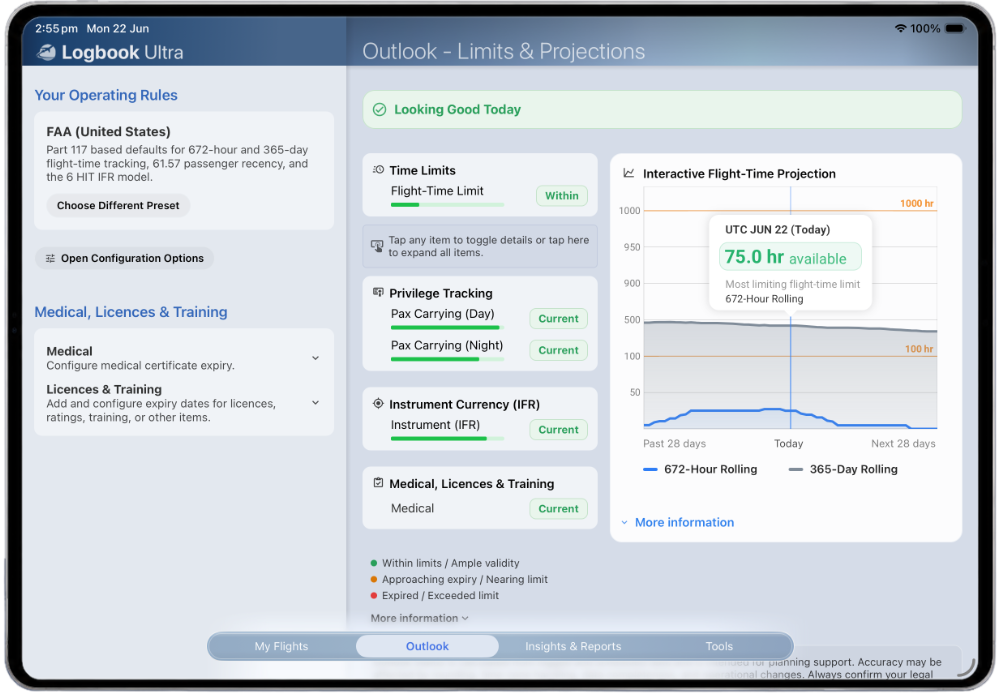
Monitor selected flight-time limits, passenger recency, IFR currency, night operations and other supported requirements through visible cards and rolling charts.
Import supported flights and duties directly within the app, synchronise eligible events to Apple Calendar and use the same records across Insights, limits and reports.
Logbook Ultra will not be the right choice for pilots who require Android, browser access or a dedicated desktop application. It may be a particularly strong fit for professional pilots who primarily use iPhone and iPad and want a more connected, visual daily workflow.
BEFORE CHOOSING
Do not pay for platform breadth you will never use, but do not choose an iOS-only product if Android or browser access is essential.
General airline-import claims do not guarantee support for every crew system, file version or duty type.
Compare how rules are presented, not only whether they can be configured.
Interactive analytics may be more useful for everyday questions than static documents.
Compare authority, employer and personal requirements at the field and layout level.
Confirm structured export before committing years of professional history.
Check which core records remain available without a network connection.
FAQS
There is no single best pilot logbook for every pilot. The right choice depends on devices, type of flying, airline or EFB integrations, reports, migration requirements, budget and preferred level of configuration.
Airline pilots should compare exact roster and duty support, Calendar Sync, previous experience, rolling flight-time limits, crew history and professional reports. Logbook Ultra is a strong option where the pilot's source format is supported and iPhone or iPad is the primary platform.
MyFlightbook is widely positioned as a free ongoing logbook. Other products may offer trials, student editions or limited free tiers. Logbook Ultra includes free use up to its current flight-hour threshold before advanced functionality requires a subscription.
Several products support airline rosters, including Logbook Ultra, LogTen, CrewLounge PILOTLOG, RB Pilot Logbook and FLYLOG.io. Coverage differs significantly, so confirm the exact airline, source system and duty support.
ForeFlight Logbook is integrated into the broader ForeFlight EFB. It can be convenient for existing ForeFlight users, while pilots seeking a more advanced professional logbook may also compare standalone products.
Usually, if the source product provides a usable structured export. Keep the original database, CSV or spreadsheet export and reference reports, then verify entries and totals after migration.
Logbook Ultra combines a visual Dashboard, interactive Insights, Crew Intel, Limits & Projections, supported airline and duty imports, Calendar Sync and focused FAA, CASA and EASA report workflows in one iPhone and iPad logbook.
TRY LOGBOOK ULTRA
A feature list cannot show how a logbook feels when you use it after every flight.
Start with the priorities that matter to your flying, narrow the options and test the real import, analysis, limits and reporting workflow before moving your records.
Download Logbook Ultra Explore pilot logbook importsChoose the product that makes your professional records easier to use, not only easier to store.